

Gram City Case Study
Gramcity is a photo editing app that helps users
easily make their photos look awesome before
sharing them on Instagram or Social media networks.


Description
Gramcity wants to design a feature to help users find awesome places to take photos, wherever they are.
Design Constraints
Design a feature for the Gram-city mobile application
This feature helps users to find physical places and location and share pictures in the social media
Goals
The goal is to help users find the best locations within any city so they can take
pictures that can be posted in their social media links directly.
Roles
UI/UX Designer
Responsibility
I created Personas, Possibility Maps from the information Gram city startup provided me.
Then I designed a working user interface screen out of it and my role was to make a
Minimum Viable Product (MVP) within a week span.
Deliverables
An Interactive Mobile App

Day 1
User Interview Question
“ Walk me through how you find great places to take a photo
in a new city”
Research Observations
Taylor
Anna
“If I’m in a new city, I like to get a good mix of typical “touristy” pictures in front of popular buildings & sites…
But I also like to find some lesser known places to take photos of..,”
“I usually look for places that will catch someone’s eye - visually stimulating, bold colors, or an interesting composition usually makes for an awesome photo”
Melanie
“I like to document what I’m actually doing. So if there’s a great place to take a photo near me, I’ll
Check it out… but I don’t really want to go out of my way just for a photo
Francesca
“Nothing worse than walking past a great photo op & finding out about it later! Spots near me while I’m actually there
Persona
Based on the user research, I made two different personas where one is more about documenting his trips but doesn’t like to travel a lot for that particular place where another persona likes to travel to take a perfect picture.
%201.png)

Possible Solutions


Insights Found
-
They wanted to know when they are near to the picture spot
-
User have different perspective for their type of photography
-
Users wanted to something easy access to the spot( less travel)
-
Time consuming for travelers to check out other users' photo places
Day 2
Lighting Demos
Explorest
Explorest ignites inspiration and helps you
explore the world’s greatest
places shares by globally recognized
photography and travel influencers
Features Included
-
Exact GPS Coordinates to the most beautiful locations
-
Plan with real-time weather and magic hour data
-
Track where you’ve been and want to go
-
Access offline

Spoto: Photo Location Scout
Organize your photo shooting locations
and discover new ones recommended
by other photographers on spoto!
Features Included
-
Organize the places we wanted to visit
-
Single time purchase
-
Planning time is saved

LocationScout - Photospots
Stop missing the most beautiful places on
your next trip and find places around you
or plan your trip ahead and bookmark
spots you like and want to visit in the future.
Features Included
-
Search over 174k entries from around the world
-
View maps of the area and get helpful tips
-
Bookmark your favorite spots
-
Switch between light and dark mode
Crazy 8's
I decided to think about and sketch potential designs for the app's solutions,concentrating on the homepage (and how it would show users the relevant information they need). In keeping with the quick-paced Design Sprint process and to wrap up my research phase, I utilized the Crazy 8's exercise to swiftly sketch out eight concepts in around eight minutes.


Three Panel Board
I sketched eight potential ideas, found the solution screens for the best ones, and then edited them significantly to create a brief storyboard with just three screens. By using this method, I was able to examine how the proposed solution appeared within the framework of the Gram city app process, which comprised the following three screens:
-
Home Screen
-
Detailed view of the Spot
-
Gallery of other people who took picture in those spots(like an inspiration or a glance)

Day 3
Storyboard
Using my three-panel solution sketches, I proceed to sketch out my entire storyboard. The storyboard allowed me to map out the prototype screens that I will create on day four of the design sprint. I added a flow where the users could take a picture and upload it to the app when they arrived at the photo-op.

Day 4
Prototype
In response to the design and project challenges listed in the beginning, the prototype I’ve quickly put together aims to support users with the below:
-
Search and Plan your trip attractions and its picture spots significantly
-
Review excellent photo-op examples of destinations, without seeing repetitive and not well captured photos, before planning time to visit the locations
-
Be part of the app community of users who share reviews, recommendations and ratings of attractions

Add your social links
to this app and share
pictures directly
Select your favorite
spots where you like to
take pictures
Enter the place where
you would like to visit/plan

Based on your preference
you will find the locations
in the homescreen
View the selected location
with pictures, shows directions
Add it to your plan
if you like to visit
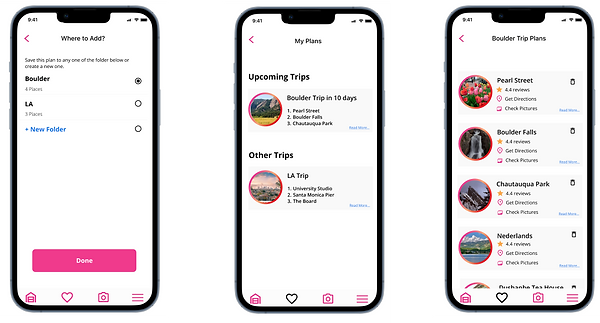
Save it to your favorite
folder, create if needed
View of the organized
screen
List of places you like
to visit are saved her,
can delete if you wanted too

Imagine if you’re in that
place and wanna capture
image
Immediately you can post in your social media links
Add a review about the
place for your other friends
to check
Click here to the interactive prototype
Usability Test Plan
The next stage of usability testing the prototype, my goals include the followings:
-
Through the scenario I give users, are users able to locate to the places they like and check the ratings
-
Are they able to save the place and able to create a list of places under a folder?
-
Are the users able to access the camera and take pictures and post on theirsocial media links?
Day 5
Inspirations
This iOS app feature for Gram City was created using a human-centered design approach with the goal of assisting users who are enthusiastic about photography in finding great photo locations quickly. The app screens are inspired from various aspects such as
-
Onboarding interactive screens, homepage screens are inspired from Dribbble shots works from other designers
-
The aerial map view is adjustable where, users can adjust a bit and view some other places near by like a coffee shops, local shops close by
-
The aerial map and photos screens are inspired from the app Spoto
Testing
To validate my proposed solution, I conducted usability test with five potential users
who all love to travel and post images in their social media. I conducted the interviews
remotely in zoom for 20 to 30 minutes.
Feedback
-
Users enjoyed the process and liked how the app could show great photo spots based on their preferences
-
Users felt this feature will reduce the time spent looking up photos on Instagram, Pinterest, and other social media sites to get inspirations that they wanted to take photos on their trips
-
Users love saving their favorite spots under the folder which makes them organized and easy to access when needed
Findings
-
Users want them to pinpoint exact location of the photos taken
-
Users also want to suggest close by attractions rather than popular attractions
-
Users want their plans to be shared with friends with link
Conclusion
Personally I enjoyed working in the Google Sprint method. What Google Venture Sprint
admired me is that it just focuses on the functions that are prioritized, and tests ideas
quickly. My major thing I needed to avoid was trying not to concentrate on minute details.